The screen looks fine until sunlight hits it. Then the fingerprints appear, along with the crumbs beside the keyboard that somehow survived yesterday’s quick wipe. You could fetch a cloth from another room. Or you could keep a small tool where the mess happens.
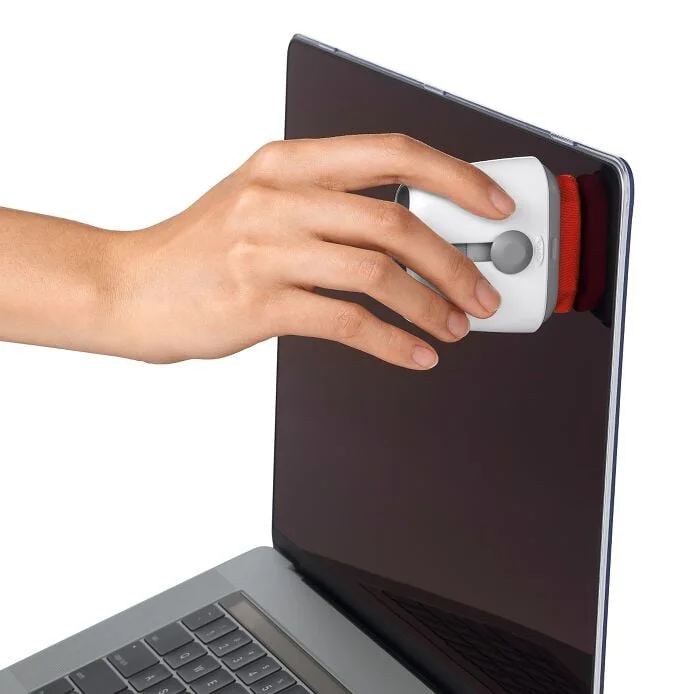
That is the sensible case for the OXO Sweep & Swipe Laptop Cleaner. Not a dramatic transformation, and not a promise to make an old laptop new again: a lower-friction way to deal with the small mess you notice every day.
Our take: shortlist it if you want a brush and wiping pad together and will keep them clean. Skip it if you already have a suitable cloth and brush within reach. This is research-based buying advice, not a hands-on review. Our product page contains an Amazon.com paid link. As an Amazon Associate I earn from qualifying purchases.
First decide which mess you actually have
Loose dust and crumbs are different from oily fingerprints. A brush can move small, loose particles; a wiping surface deals with marks on a suitable surface. OXO puts both functions into one tool, with a retractable brush at one end and a microfiber pad at the other.
That combination is useful when both jobs recur. If your only annoyance is fingerprints on a large monitor, a larger clean cloth may be simpler. If your keyboard has a sticky key or a spill underneath it, buying a surface cleaner does not address the underlying problem. Follow the device manufacturer’s support instructions instead of pushing a brush into the mechanism.
Before ordering, describe the problem in one sentence. “I forget to wipe down my laptop because the cloth is never nearby” makes a stronger case for this tool than “I need something that will fix my keyboard.”
The convenience is real; the need is optional
The attraction is having two small tools in one place. On a shared desk, you can finish work, tidy the exposed surfaces according to the computer’s care instructions, put the cap on and pack the cleaner beside your cables. There is less to remember than with loose accessories scattered through a bag.
But convenience depends on where you store it. A cleaner buried beneath chargers is still a cleaner you may not use. Give it an accessible, clean pocket, not the same dusty compartment as keys and loose crumbs. The protective cap is a storage feature, not a reason to stop checking the pad before use.
Here is the no-purchase trial: place your existing appropriate cloth beside the laptop for a week. If that solves the problem, keep doing it. If you repeatedly want a small brush as well, the combined tool has a clearer job to do.
Check the screen instructions before touching the screen
OXO markets this cleaner for laptops, phones and tablets. That is not the same as confirmation for every coating, specialist display or accessory. Your device maker’s instructions remain the deciding source, especially for displays with unusual finishes.
Do not interpret “microfiber” as permission to press harder on a stubborn mark. Start by checking that the tool is clean and that the cleaning method is suitable for the device. If a mark resists the approved routine, stop and consult the maker’s guidance rather than escalating pressure or improvising a cleaning liquid.
The same principle applies to the brush: accessible loose debris is the relevant use case. We are not recommending removal of keycaps, insertion into ports, or cleaning inside a powered device. Those are different tasks, and this purchase should not encourage you to treat them as routine dusting.
The cleaner itself needs a cleaning routine
One useful detail in OXO’s own instructions is that the two ends have separate care directions. For the pad, the company specifies spot cleaning with warm water and mild soap, then blotting excess moisture and air drying. For the bristles, it specifies rinsing, removing excess moisture, reshaping, and drying flat with the bristles extended.
This matters to the buying decision. If you want an accessory you never maintain, this is not it. Set aside drying time; do not wash it immediately before packing it against electronics. A second clean cloth can be useful while the tool is drying, which also shows why a combined cleaner does not eliminate every separate cleaning item.
Inspect before use, not after a scratch or smear appears. Retire or replace a tool that is damaged or cannot be cleaned appropriately. We have not established a service life or a replacement-pad program, so neither is included in our recommendation.
Brush-and-pad tool versus the alternatives
An appropriate microfiber cloth: the simpler starting point for routine wiping. It folds flat and can cover more area, but does not provide the brush function. Choose based on the device maker’s guidance, not a generic “screen-safe” label alone.
A separate soft cleaning brush: useful if loose debris is the only issue. Keep it dedicated to electronics rather than borrowing a brush already used around a sink or workshop.
A large multi-piece cleaning kit: worthwhile only if you can identify a purpose for the extra pieces. More tips and bottles are not automatically better, and they introduce more opportunities to use an unsuitable method.
Nothing new: the right answer if your existing routine works. This is a convenience purchase, not essential maintenance equipment that every laptop owner must buy.
What to check on the Amazon listing
Our selected listing is the Sweep & Swipe cleaner, ASIN B07W1L7TCF, not an electronics-brush bundle. Check the exact item, pack quantity and seller before ordering. A brand name on a listing does not mean the brand is the seller; the observed seller at research time was a third party.
We do not maintain a live price, review score or stock promise here. Amazon.com is the US shopping option. Delivery, returns and any import costs depend on your destination, and this US affiliate link does not establish commission coverage on other Amazon country sites.
A quick decision before you buy
| Your recurring problem | Start here | When this tool makes sense |
|---|---|---|
| Fingerprints only | An appropriate clean cloth | You value a compact, capped pad kept nearby |
| Loose keyboard dust | A dedicated soft brush | You also want a wiping pad in the same tool |
| Sticky keys or liquid damage | Device-maker support | A surface cleaner is not the solution |
| An already reliable routine | Keep your current tools | No upgrade is necessary |
Buy less friction, not a cleaning miracle
The Sweep & Swipe is most persuasive when your routine is already sensible but inconvenient: a cloth that goes missing, a keyboard that gathers loose dust, and a bag with room for one small combined tool. It is less persuasive when you expect it to repair damage or replace device-specific cleaning advice.
If convenience is the missing piece, see the OXO Sweep & Swipe product notes and Amazon option. Otherwise, put a clean, suitable cloth where you will actually use it. A tidy screen is the goal; a new accessory is only one possible route.